
Download Emsisoft Emergency Kit – Free Portable Security Suite for Windows, Mac, Android & iOS
Emsisoft Emergency Kit is a powerful, portable, and free security tool designed for quick malware detection, removal, and system cleanup. This compact software suite fits on a USB drive, making it ideal for IT professionals, students, and everyday users who need reliable protection on the go. With its lightweight design and no installation required, Emsisoft Emergency Kit allows you to scan, analyze, and clean infected systems from any computer—perfect for fixing your uncle’s old PC or troubleshooting a virus-ridden machine.
Built on the robust a-squared antivirus engine, the scanner detects viruses, spyware, and rootkits with high accuracy. The suite includes three core tools: a real-time scanner, HiJackFree for deep system analysis, and BlitzBlank for deleting stubborn files and registry entries. Whether you're dealing with a locked file, a malicious startup program, or a persistent malware infection, this emergency security kit delivers fast, secure, and effective results.
With support for Windows, Mac, and mobile devices, Emsisoft Emergency Kit is a must-have digital toolkit for anyone serious about cybersecurity.
Core Features of Emsisoft Emergency Kit
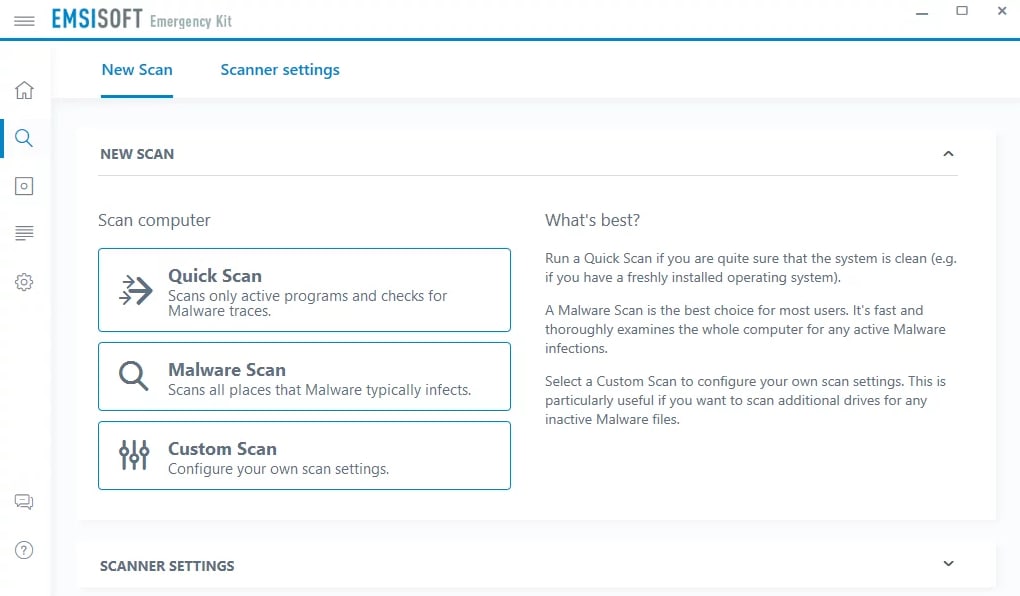
One of the standout aspects of Emsisoft Emergency Kit is its modular design, combining three specialized tools into a single portable package. The first tool, the malware scanner, is powered by the a-squared antivirus engine—one of the most trusted engines in the cybersecurity industry. This scanner performs deep system checks without requiring installation, making it perfect for emergency use on infected or locked-down machines. It detects viruses, spyware, trojans, and rootkits, even those that hide in the system’s hidden processes or startup routines. The scanner supports both graphical and command-line interfaces, giving advanced users flexibility in execution.
The second tool, HiJackFree, is a comprehensive system analysis utility. It provides a detailed overview of running processes, active ports, startup programs, ActiveX drivers, and browser plug-ins. This makes it invaluable for identifying suspicious software that may be running in the background.
Unlike many other tools, HiJackFree doesn’t automatically remove items—it shows you exactly what’s running, allowing you to make informed decisions. This transparency is essential for troubleshooting and preventing false positives. The tool also generates detailed reports, which can be shared with tech support or used for further investigation.
The third component, BlitzBlank, is a powerful deletion utility designed for files, folders, registry keys, and drivers that are locked or blocked by malware. Many viruses prevent users from deleting malicious files, but BlitzBlank bypasses these restrictions and removes them instantly. This is especially useful when dealing with stubborn malware that resists standard deletion methods. Together, these three tools form a complete emergency response system—perfect for on-the-go cleanup, system recovery, or digital forensics. All tools are updated regularly, ensuring protection against the latest threats.
How to Install and Use Emsisoft Emergency Kit
Installing Emsisoft Emergency Kit is as simple as copying the files to a USB flash drive—no traditional installation is required. This makes it one of the most convenient portable security tools available. Begin by downloading the latest version from the official Emsisoft website.
The download is free and includes a compressed archive (ZIP file). Extract the contents to your USB drive using any standard extraction tool like Windows Explorer or 7-Zip. Once done, your emergency kit is ready to use.
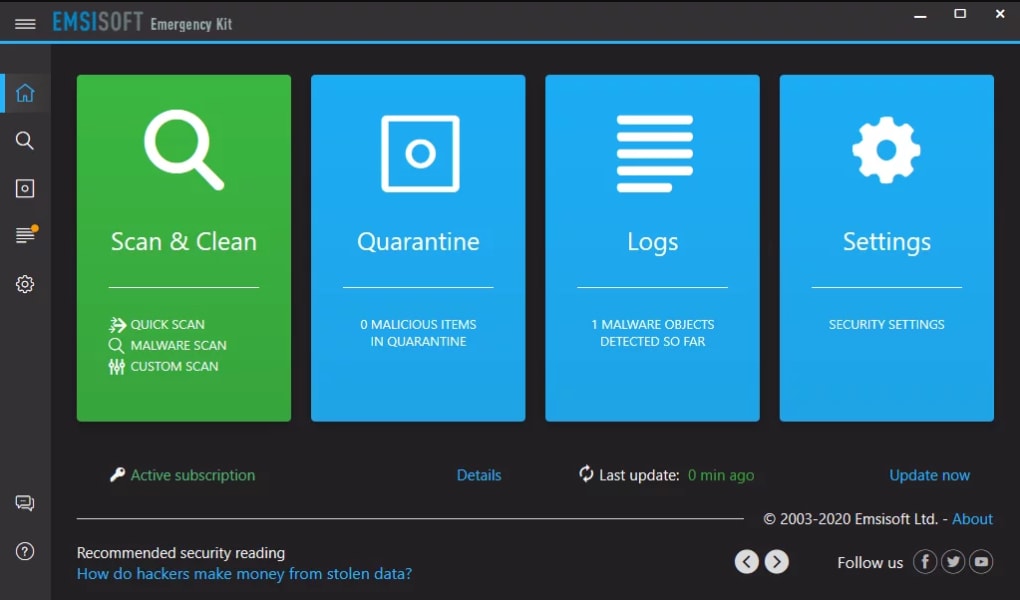
To use the kit, plug the USB drive into the target computer. Navigate to the folder containing the tools, and double-click the EmergencyKit.exe file to launch the main interface. From here, you’ll see options to start the scanner, launch HiJackFree, or open BlitzBlank.
The scanner is the first step—run a full system scan to detect any threats. The interface is intuitive, with clear progress indicators and a summary report after completion. If threats are found, you can choose to quarantine or delete them.
For deeper troubleshooting, use HiJackFree to analyze startup items, active processes, and network connections. Review the list carefully—look for unknown programs, high memory usage, or suspicious URLs. You can export the report for further analysis.
When you need to delete a file that won’t open or delete, use BlitzBlank. Select the file or registry key, confirm the action, and the tool will remove it instantly. Always back up critical data before deletion.
The entire process is secure, fast, and requires no admin rights on the target machine, making it ideal for use in public or restricted environments.
Compatibility and System Requirements
Emsisoft Emergency Kit is designed for maximum compatibility, supporting a wide range of operating systems. The primary platform is Windows, including Windows 7, 8, 8.1, and 10 (both 32-bit and 64-bit versions). It also runs smoothly on Windows 11 without requiring additional drivers or updates. While the kit is primarily built for Windows, Emsisoft offers a limited version for Mac users, allowing basic scanning and analysis on macOS systems. For mobile users, the Emsisoft Emergency Kit is compatible with Android and iOS through companion apps that allow remote scanning and report viewing.
System requirements are minimal—no more than 500 MB of disk space and 1 GB of RAM are needed. The tools are optimized to run efficiently even on older hardware, making it perfect for reviving outdated PCs. The kit doesn’t require internet access during scanning, though an update is recommended before use to ensure the latest virus definitions are loaded. Updates are automatic and can be performed via the USB drive when connected to a secure network.
One of the biggest advantages of Emsisoft Emergency Kit is its portability. You can carry it on a small USB drive, a memory card, or even a cloud storage device (when used with a secure password). This makes it ideal for IT technicians, students, and home users who need a reliable security tool in any situation. Whether you're at a client’s office, a school computer lab, or a friend’s house, Emsisoft Emergency Kit is always ready to help.
Pros and Cons of Emsisoft Emergency Kit
- Pros:
- Free and completely portable—no installation needed
- Powerful malware scanner based on a-squared engine
- Includes HiJackFree for deep system analysis
- BlitzBlank removes locked or blocked files and registry entries
- Supports Windows, Mac, Android, and iOS
- Lightweight and runs on older systems
- Regular updates ensure protection against new threats
- Secure and safe for use on public or shared computers
- Cons:
- Limited documentation—mostly a basic readme file
- No real-time protection (only on-demand scanning)
- Advanced features require some technical knowledge
- Mac and mobile versions are less feature-rich than Windows
- Doesn’t include firewall or anti-phishing tools
Frequently Asked Questions (FAQ)
Can I use Emsisoft Emergency Kit on a virus-infected computer?
Yes, absolutely. Emsisoft Emergency Kit is specifically designed for use on infected systems. Since it runs from a USB drive and doesn’t install anything, it avoids being blocked by malware. You can scan, detect, and remove threats even when the system is unstable.
Is Emsisoft Emergency Kit safe to use?
Yes, the software is safe and trusted by IT professionals worldwide. It’s developed by Emsisoft, a reputable cybersecurity company. The tools are designed to detect and remove malware, not harm your system. Always review results before deletion to avoid accidental removal of system files.
Do I need an internet connection to use it?
Not during scanning. However, it’s recommended to update the virus definitions before use by connecting to the internet. This ensures the scanner has the latest threat database.
Can I run it on Mac or mobile devices?
Yes, Emsisoft Emergency Kit supports macOS, Android, and iOS. The Windows version is the most complete, but the mobile and Mac versions allow scanning and report viewing. Some features like BlitzBlank may be limited on non-Windows platforms.
How often should I update the kit?
It’s best to update the kit before each use. Emsisoft releases updates frequently to keep up with new malware. You can download the latest version from the official website and copy it to your USB drive.
Conclusion: A Must-Have Tool for Every Digital User
If you’re looking for a reliable, free, and portable security tool to handle malware emergencies, Emsisoft Emergency Kit is one of the best options available. Its combination of a powerful scanner, deep analysis tool, and file deletion utility makes it a complete solution for system recovery. Whether you’re an IT professional, student, or casual user, having this kit on a USB drive can save hours of troubleshooting and prevent data loss.
With easy installation, broad compatibility, and regular updates, Emsisoft Emergency Kit delivers peace of mind. While it lacks real-time protection and has limited documentation, its strengths far outweigh its weaknesses. For anyone who values security, portability, and control over their digital environment, this is a tool you should download today.
Download Emsisoft Emergency Kit now and take control of your system’s security—anytime, anywhere.







